Features
Everything your SolidWorks team needs to manage design data, track revisions, and collaborate — plus features you won't find in any other PDM software. See what makes PalmPDM unique.
Core Features
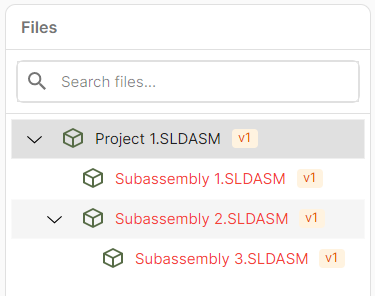
Automatic File Organization
Project structure mirrors your main SolidWorks assembly tree and updates automatically on every check-in, keeping your file organization in sync with your design.
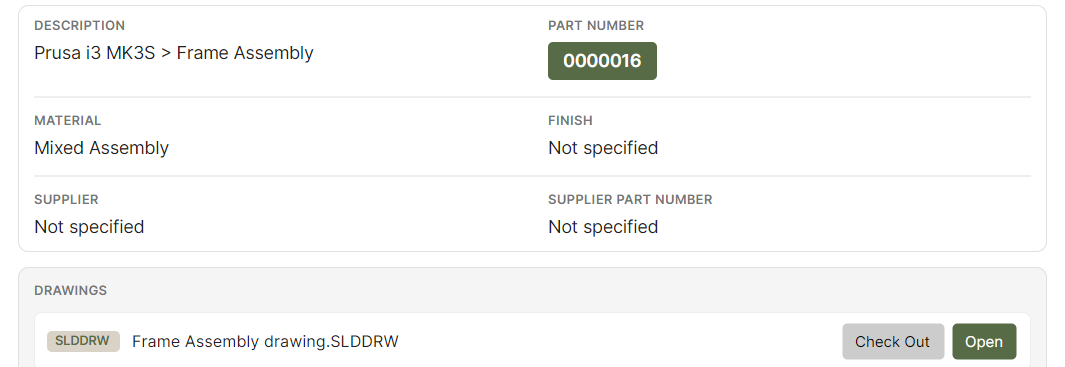
Custom Metadata & Part Numbering
Define custom fields and properties for your parts and assemblies. Generate consistent part numbers automatically based on your custom schemas to eliminate manual errors.
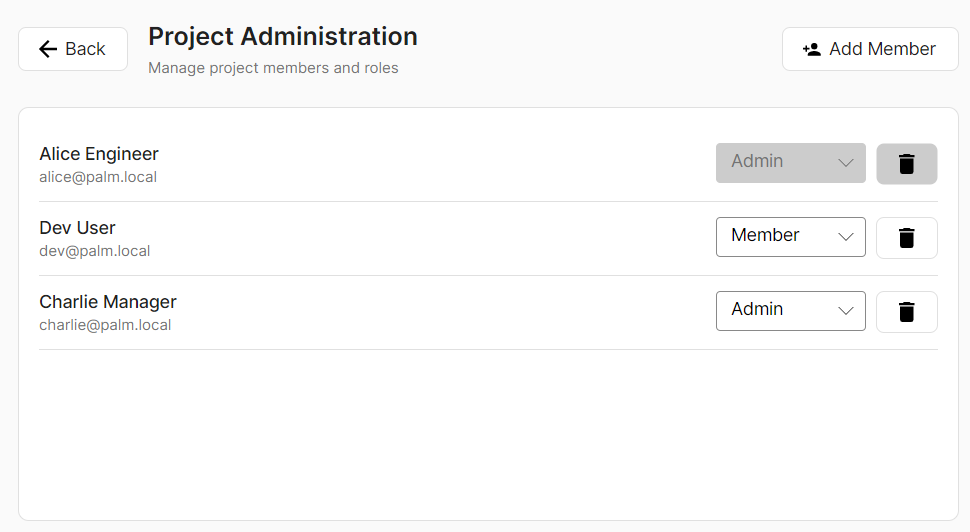
User Permissions
Control access with role-based permissions. Define who can view, edit, or approve files at the project or folder level.
Collaboration
Instantaneous Updates
Files are always up to date — no need to manually "get latest version" like in SolidWorks PDM. Changes are available the moment they are checked in.
Concurrent Checkout Controls
Diff and merge functionality allows multiple users to edit files simultaneously, eliminating bottlenecks from single-user file locking.
Check In / Check Out
Standard file locking still available. Check out files to make edits and check them back in to keep your team in sync.
Personal Workspace
Work in your own isolated workspace before publishing. Test and iterate without affecting the shared project.
Release & Workflows
Part Release Capabilities
BOMs are automatically managed and release artifacts organized for easy distribution to suppliers — no manual assembly required.
Customizable Workflows
Add any state transitions your team needs and integrate ECO processes directly into your PDM system.
Cloud-Based Access
Set up in under 30 minutes. No local server or IT support required. Access your designs from anywhere with website access.
Quick Access & Related Documents
Pin frequent projects, access recent files instantly, and link datasheets or specs directly to parts and assemblies.